Indonesia
 English
 Arabic
 French
 Spanish
 Portuguese
 Deutsch
 Turkish
 Dutch
 Italiano
 Russian
 Romaian
 Portuguese (Brazil)
 Greek
Jamii Insight
Party |
2026-08-15 06:34:04
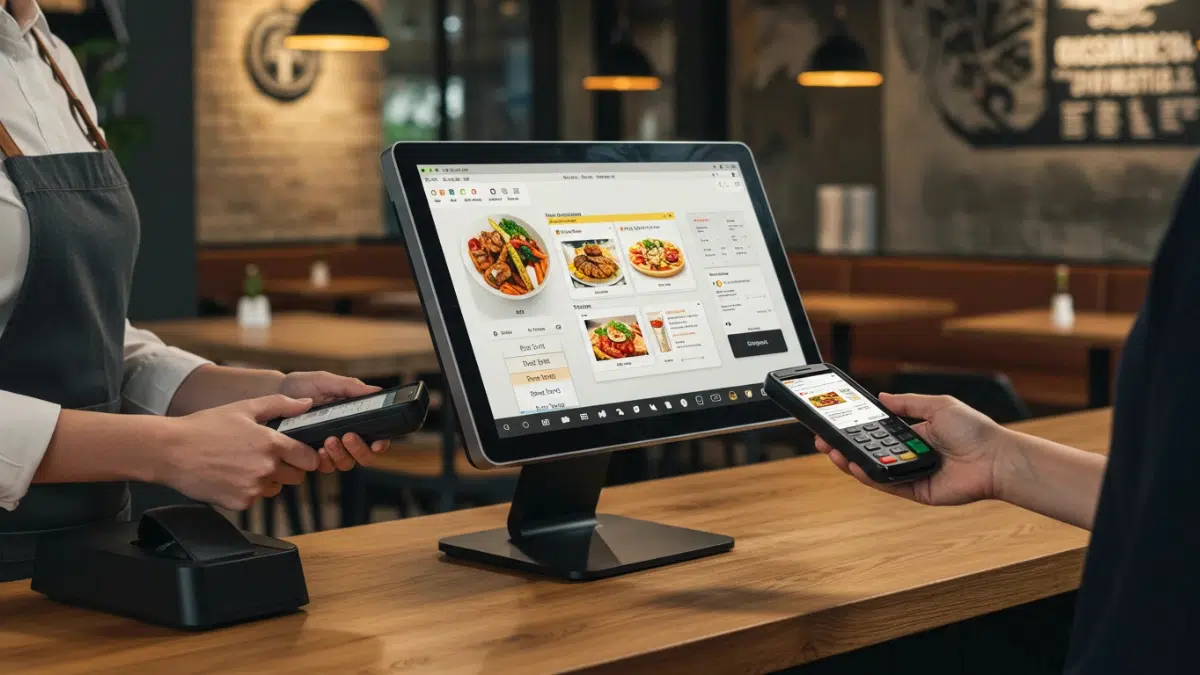
Every time a customer pays for a coffee, a pair of shoes, or a haircut, a Sales tracking system is usually working behind the scenes. Once little more than a cash drawer with a calculator, today's point of sale technology handles payments, tracks stock, records customer data, and produces reports that help owners make smarter decisions. This guide explains what a point of sale system is, how it works, the main types, key features, and how to choose the right one for your business.
A point of sale (POS) system is the combination of hardware and software that a business uses to complete sales transactions. The "point of sale" is the moment and place where a customer pays for goods or services. A POS system captures that moment, calculates the total, accepts payment, issues a receipt, and updates business records automatically.
Modern systems go well beyond checkout. They connect sales, inventory, staff management, and customer information in one place, which saves time and reduces manual errors.
The process is simple from the customer's side but involves several steps in the background:
Item entry. The cashier scans a barcode, taps an item on a touchscreen, or searches the product catalog.
Total calculation. The software adds prices, applies discounts, and calculates taxes.
Payment processing. The customer pays by cash, card, contactless method, or mobile wallet. Card payments are sent securely to a payment processor for approval.
Receipt and records. A printed or digital receipt is issued, and the sale is saved to the database.
Inventory update. Stock levels adjust instantly, so the business always has a current count.
Typical hardware includes a terminal or tablet, barcode scanner, receipt printer, cash drawer, card reader, and sometimes a customer-facing display. Restaurants may also use kitchen display screens and handheld ordering devices.
The software is the brain of the system. It manages the product catalog, processes transactions, stores sales history, and generates reports. Many modern platforms are cloud-based, meaning data is stored online and can be accessed from any approved device.
This component connects the system to banks and card networks. Fees, speed, and supported payment types vary between providers, so it is worth comparing options carefully.
These systems run on local computers and servers inside the business. They offer strong control and can work without internet, but they often cost more upfront and require manual updates and maintenance.
Cloud systems operate over the internet, usually through a monthly subscription. They update automatically, back up data, and let owners check sales from anywhere. They are popular with small and growing businesses.
Mobile systems use a smartphone or tablet with a small card reader. They suit market stalls, pop-up shops, food trucks, and service providers who work on the move.
Customers place orders and pay themselves at a screen. Fast-food chains, cinemas, and large retailers use kiosks to shorten queues and reduce labor demands.
Inventory management. Track stock in real time, set low-stock alerts, and manage suppliers.
Sales reporting. Review best-selling items, peak hours, and profit margins.
Employee management. Record shifts, set permissions, and monitor performance.
Customer management. Store purchase history and run loyalty or rewards programs.
Multiple payment options. Accept cards, contactless payments, and digital wallets.
Integrations. Connect with accounting software, online stores, and marketing tools.
Offline mode. Keep selling during internet outages and sync data later.
POS Ireland solutions help businesses manage sales, billing, inventory, payments, and daily transactions through one centralized system.
Faster checkout. Automated calculations and quick scanning shorten waiting times and improve the customer experience.
Fewer errors. Automatic pricing and tax handling reduce the mistakes common with manual entry.
Better inventory control. Accurate stock counts help prevent both shortages and overstocking.
Useful business insights. Detailed reports show what sells, when it sells, and who buys it, which supports better purchasing and marketing decisions.
Stronger security. Modern systems use encryption and user permissions to protect sensitive payment and business data.
Retail stores rely on them for barcode scanning and stock tracking. Restaurants and cafes use them for table management, split bills, and kitchen orders. Salons and spas benefit from appointment booking and service tracking. Pharmacies, grocery stores, and hotels also depend on specialized POS setups tailored to their daily operations.
Follow these steps to find a good match:
Define your needs. List what your business must do, such as table service, online sales, or multi-store management.
Set a realistic budget. Consider hardware, software subscriptions, payment processing fees, and setup costs, not just the sticker price.
Check ease of use. A simple interface shortens staff training time.
Review integrations. Make sure it works with the tools you already use.
Test customer support. Reliable help matters when a problem happens during busy hours.
Plan for growth. Choose a system that can add locations, users, and features as you expand.
Try before you commit. Many providers offer free trials or demos.
Many owners choose the cheapest option without checking hidden fees, or buy a system packed with features they never use. Others overlook contract terms, data ownership, or how easily they can export their records if they switch providers. Skipping staff training is another frequent error that leads to slow adoption and avoidable mistakes.
POS technology continues to evolve. Contactless and mobile wallet payments are growing, artificial intelligence is being used for sales forecasting and personalized offers, and unified commerce platforms are connecting physical stores with online channels. Expect more automation, faster payments, and deeper analytics in the years ahead.
Is a POS system only for large businesses?
No. Many affordable options are designed for small shops, home-based sellers, and startups.
Can a POS system work without internet?
Many cloud-based systems offer an offline mode that stores transactions and syncs them when the connection returns.
What is the difference between a cash register and a POS system?
A cash register mainly records sales and holds cash. A POS system also manages inventory, reporting, customers, and employees.
A point of sale system is a core business tool that speeds up checkout, improves accuracy, and delivers insights that support growth. By understanding the different types, essential features, and common pitfalls, you can select a system that fits your budget and goals. Take time to compare options, test before buying, and choose a solution that can grow with your business.
Modern business tools help streamline transactions, improve accuracy, and keep sales, inventory, and daily operations well organized.